

How to Create Viral Celebrity Selfie Videos Using AI
Celebrity selfie videos are exploding across Instagram Reels, YouTube Shorts, and TikTok. You’ve probably seen clips where someone casually takes selfies with movie stars, football legends, or tech founders—so realistic that people stop scrolling just to comment, “Is this real?”
What makes these videos perform so well is simple: familiar faces + realism + movement. When done correctly, they trigger curiosity, shock, and shareability at the same time.
In this guide, you’ll learn how to create viral celebrity selfie videos using AI, from planning the shots to turning still images into cinematic video clips that feel authentic and scroll-stopping.
Why Celebrity Selfie Videos Go Viral So Fast
Before jumping into the process, it’s important to understand why this format works:
- People instantly recognize celebrities
- Selfie angles feel personal and unscripted
- Behind-the-scenes environments increase realism
- Short, handheld motion keeps viewers engaged
- The content feels exclusive and “unseen”
When all these elements come together, platforms naturally push the video higher due to strong watch time and comments.
Step 1: Create a Smart Celebrity List
Start by deciding who you want to appear with in your video. Choose people your target audience already loves and recognizes instantly.
Popular categories include:
- Movie actors
- Sports stars
- Business founders
- Famous TV or streaming characters
- Public figures with global recognition
💡 Tip: Mix different industries in one video (for example, an actor + a footballer). This increases replay value and comments.
Each celebrity will require one high-quality selfie image, so plan the order carefully.
Step 2: Generate Ultra-Realistic Celebrity Selfie Images
This step is the foundation of everything. If your images don’t look real, the video won’t feel real either.
Image Creation Best Practices
- Use one clear reference photo of yourself
- Keep lighting realistic (studio, stadium, set, backstage)
- Avoid exaggerated expressions
- Stick to natural clothing and poses
- Always use selfie-style framing
Base Image Prompt (Human-Style Setup)
Your prompt should describe a real situation, not a dramatic fantasy. Think like a photographer, not a designer.
Example structure:
- Who is in the selfie
- Where they are standing
- What’s happening in the background
- Who else is present on set
This makes the image feel like it was captured during an actual moment, not created for attention.
Image Prompt
Base Image Prompt Template
Create a realistic, high-fidelity (8K) image based on the attached reference photo.
Maintain the exact facial features, skin tone, bone structure, hairstyle, and expression of the attached person with zero alteration and no face swapping.The attached person is taking a selfie with [Celebrity Name], standing at [location or set].
Crew members are adjusting lighting and equipment, with visible cables and gear.
Directors and managers stand behind, discussing the next scene.
Step 3: Create Images for Every Celebrity
Repeat the same process for each celebrity on your list.
Make sure:
- Your face looks consistent in every image
- Lighting changes naturally depending on location
- The camera angle remains believable
- Background activity feels realistic
Save the images in sequence so your video flow feels smooth later.
Step 4: Turn Images Into a Smooth Celebrity Video
Once your images are ready, it’s time to bring them to life.
Instead of jumping cuts, use image-to-video motion to simulate movement between scenes. This makes the content feel like one continuous moment instead of separate clips.
How the Video Flow Should Feel
- First selfie happens naturally
- The camera moves or follows the person
- Location changes during motion
- Next celebrity appears
- Another selfie is taken
The key detail here is handheld camera movement. It mimics how people actually record content and removes the “edited” look.
Step 5: Use Frame Linking for Seamless Transitions
To make your video feel premium and loop-friendly:
- Use the last frame of one clip as the first frame of the next
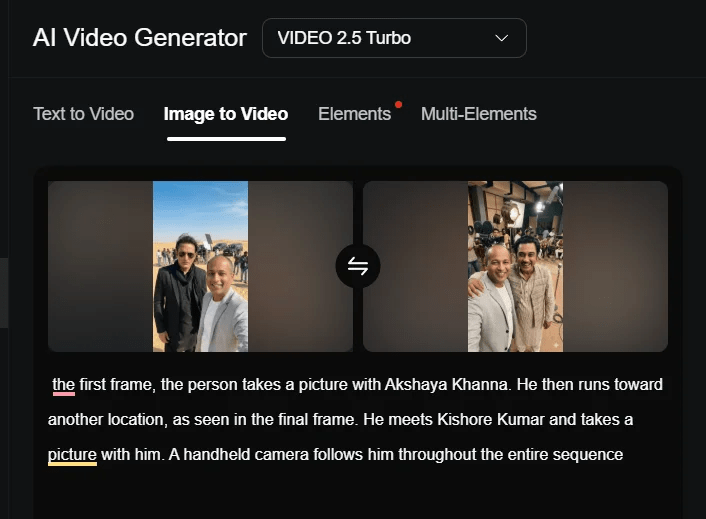
- Maintain the same camera angle and motion direction
- Keep the person centered in frame
This technique dramatically improves retention and makes viewers rewatch the clip without realizing it.
Video Prompt
Video Prompt Template
In the first frame, the person takes a picture with [Celebrity 1].
He then runs toward another location, as shown in the final frame.
He meets [Celebrity 2] and takes a picture with them.
A handheld camera follows him throughout the entire sequence.
Step 6: Final Editing for Viral Performance
Once your clips are generated, move to editing.
Editing Tips That Increase Reach
- Keep total length under 30 seconds
- Slightly increase playback speed (not too much)
- Add subtle ambient sound or crowd noise
- Avoid loud music in the first 2 seconds
- Let visuals do the talking
For short platforms, clarity beats complexity every time.
Export as:
- One continuous video or
- Multiple short clips for testing performance
Advanced Tips for Cinematic Results
If your images feel flat, adjust these elements:
- Bring the camera slightly closer
- Add shallow background depth
- Use neutral expressions instead of smiles
- Place light sources behind or to the side
Small realism details often matter more than dramatic setups.
Advanced Cinematic Prompt
Create a hyper-realistic, high-fidelity (8K) cinematic close-up selfie using the attached reference photo.
The attached person (not smiling) is taking a casual handheld selfie with Tom Cruise on a Top Gun: Maverick hangar set.
Maintain the exact facial features, skin tone, proportions, and structure of the attached person with zero alteration — no face swapping, no stylization, no identity drift.
Common Mistakes to Avoid
Many creators fail not because of tools, but because of execution.
Avoid these:
- Over-stylized faces
- Unrealistic clothing choices
- Perfect studio lighting in casual scenes
- Sharp camera angles that don’t look handheld
- Too many celebrities in one clip
Subtlety is what sells realism.
Where These Videos Perform Best
This format works especially well on:
- Instagram Reels
- YouTube Shorts
- TikTok
Post consistently, test different celebrity combinations, and pay attention to comments. The audience will tell you what to repeat.
Final Thoughts
If done correctly, celebrity selfie videos can outperform traditional content by a huge margin. The secret isn’t complexity—it’s believability.
When the setting feels real, movement feels natural, and expressions feel human, viewers stop scrolling. And when viewers stop scrolling, platforms push your content further.
Master this workflow once, and you can reuse it endlessly with different personalities, locations, and storytelling angles.
Sam is a dedicated scholarship writer who helps students find genuine financial aid opportunities. He explains eligibility, benefits, and application steps in simple English so students can easily apply without confusion. His goal is to make quality educational support easier to access for everyone.